
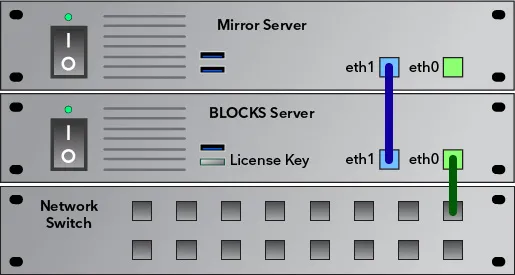
Supports hardware redundancy for mission critical Blocks applications. The Mirroring Service keeps the content of the backup
server in sync with the main server. In case of a failure of the main server, you can immediately switch over to the backup server
to keep your installation working while the main server is being repaired or replaced.
This page is available if your license includes the Mirroring Service option: https://pixilab.se/docs/blocks/server/mirror It shows the mirroring status, such as whether the
mirroring server is connected, when the last synchronizations were performed, etc.
• Mirror Connected states whether the mirroring service connection has been established.
• Last Full Sync. Time when the last full sync was performed. This is performed at the moments specified in Blocks’ configuration file, or when pressing the "Synchronize Now" button. A full sync means that all pertinent files (including all files inside
the Blocks Root directory) have been synchronized.
• Last Incremental Sync. Time when the most recent incremental sync was performed. Incremental syncs are performed on
a file-by-file basis as you edit content and files in the Blocks editor.
• Sync Errors is incremented whenever an error occurs performing a sync operation. If this value keeps increasing after a
server start, you should take a look in the mirror service’s log file, which can be found under Manage, Status and Log, Archive.
• Last Sync Error. Time when the last sync error, if any, occurred.
102
• Mirror Clock Offset. Time difference between the main and mirror server’s clocks. If the mirror server isn’t connected to
the internet (or other clock source), its clock may drift gradually. If this difference is more than a few minutes, you should set
the clock manually on the mirror server.
• Mirror Disk Space lets you check that there’s a healthy amount of free space on the mirror server’s disk. If this value dips
below 10 GB or so, you should take action to rectifying this, since the mirroring will fail if the server runs out of disk space.
That should not normally occur, since files deleted on the main server are then also deleted on the mirror server.
No reviews yet.