
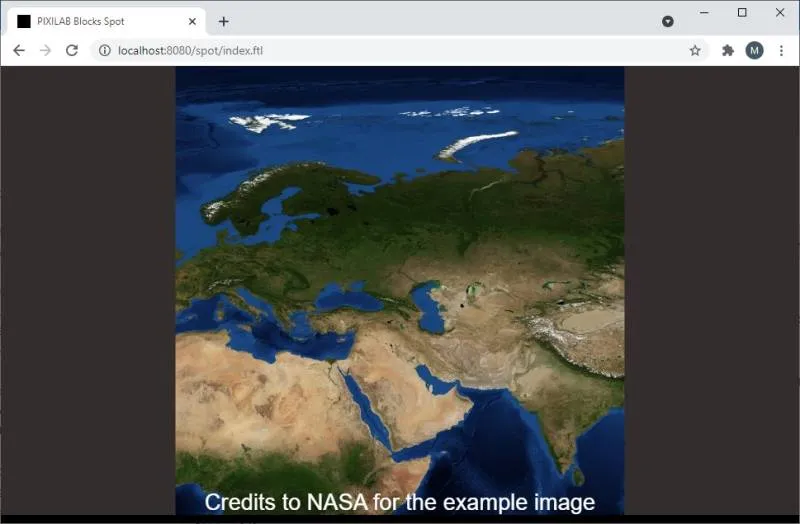
The Deep Zoom block type lets you display a very hight resolution image (up to 1000 megapixel), with efficient zooming and
panning into the image. Child blocks can be added at desired positions, and made to appear/disappear at desired zoom depths.
NOTE: This is a premium block type, requiring additional license options in order to be displayed.
Start by dropping a high resolution image into the box named "Drop Image File Here" and wait for it to be processed. Zoom and
position the image to its desired starting position, then press "Set Initial Position". This position will be applied when the block is
first shown.
You can add various kinds of child blocks, acting as markers, interactive elements (buttons) or to augment the large image in
other ways. Size and position the child block as desired (with all positions given relative to the large image’s top left corner). Each
child block has the following settings specific to the Deep Zoom block:
• Scale adjusts the relative size the child block appears in.
• Visible From and Visible Until limits the zoom range during which the child block will be shown. This is particularly useful
when a large number of child blocks are clustered in a relatively small area, where you may want to represent those with a single item when zoomed out, making the individual child blocks appear only when zoomed in.
• Fixed Size makes the child block appear with a fixed size regardless of the zoom level. If not selected, the child block scales
with the image.
• Anchor Point controls which part of the child block that remains fixed when zooming, and corresponds to the large image
position specified by Left and Right.
No reviews yet.